
OpenStreetMap Nominatim Server for Geocoding
Here's how to install the OpenStreetMap Nominatim service on your own server. It can be used to geocode and reverse geocode addresses and map coordinates. You will also get a web interface which loads map tiles from openstreetmap.org while doing geocoding requests using your own server.
I was faced with thousands of geocoding requests per hour, and with such a high volume it is not wise to burden the global OSM servers. Even with aggressive caching it would have potentially been too much.
I will use Ubuntu 14.04 LTS as the platform. Just a basic install with ssh server. We will install Apache to serve http requests. Make sure you have enough disk space and RAM to hold the data and serve it efficiently. I used the Finland extract, which was about a 200 MB download. The resulting database was 26 GB after importing, indexing and adding Wikipedia data. The Wikipedia data probably actually took more disk space than the OSM data. My server has 4 GB RAM, which seems to be enough for this small data set.
Table of Contents
1 Software requirements
PostgreSQL with PostGIS extension:
sudo apt-get install \
  postgresql postgis postgresql-contrib \
  postgresql-server-dev-9.3 postgresql-9.3-postgis-2.1 \
  postgresql-doc-9.3 postgis-doc
Apache with PHP5:
apt-get install \
  apache2 php5 php-pear php5-pgsql php5-json php-db
Git and various tools:
apt-get install \
  wget git autoconf-archive build-essential \
  automake gcc proj-bin
Tool for handling OpenStreetMap data:
apt-get install osmosis
Needed libraries:
apt-get install \
  libxml2-dev libgeos-dev libpq-dev libbz2-dev libtool \
  automake libproj-dev libboost-dev libboost-system-dev \
  libboost-filesystem-dev libboost-thread-dev \
  libgeos-c1 libgeos++-dev lua5.2 liblua5.2-dev \
  libprotobuf-c0-dev protobuf-c-compiler
2 Kernel tuning
We must increase kernel shared memory limits. Also we'll reduce swappiness and set the kernel memory overcommit to be a bit more conservative. Make sure you have anough swap space, more than physical memory is a good idea.
These have been estimated using 4 GB RAM.
sysctl -w kernel.shmmax=4404019200
sysctl -w kernel.shmall=1075200
sysctl vm.overcommit_memory=2
sysctl vm.swappiness=10

echo "kernel.shmmax=4404019200" >> /etc/sysctl.conf
echo "kernel.shmall=1075200" >> /etc/sysctl.conf
echo "vm.overcommit_memory=2" >> /etc/sysctl.conf
echo "vm.swappiness=10" >> /etc/sysctl.conf
3 PostgreSQL tuning
The following directives were set in /etc/postgresql/9.3/main/postgresql.conf:
shared_buffers                = 2048MB
work_mem                      = 50MB
maintenance_work_mem          = 1024M
fsync                         = off    # dangerous!
synchronous_commit            = off
full_page_writes              = off    # dangerous!
checkpoint_segments           = 100
checkpoint_timeout            = 10min
checkpoint_completion_target  = 0.9
effective_cache_size          = 2048M
The buffer and memory values depend on your available RAM so you should set sane values accordingly. These are good for 4 GB RAM.
There are two truly dangerous settings here. Setting fsync off will cause PostgreSQL to report successful commits before the disk has confirmed the data has been written successfully. Setting full_page_writes off exposes the database to the possibility of partially updated data in case of power failure. These options are used here only for the duration of the initial import, because setting them so makes the import much faster. Fsync and full page writes must be turned back on after the import to ensure database consistency.
The synchronous_commit also jeopardizes the durability of committed transactions by reporting successful commits to clients asynchronously, meaning that the transaction may not have been fully written to disk. It does not compromize consistency as the two previous directives discussed. It just means that in the case of power failure, some recent transactions that were already reported to the client as having been committed, may in fact be aborted and rolled back. The database will still be in a consistent state. We'll leave it off because it speeds up the queries, and we don't really care about it in this database. We can always rebuild it from scratch. But if you have other important databases in the same database cluster, I would recommend turning it back on as well, since the setting is cluster-wide.
The maintenance_work_mem will also be reduced to a lower value later, after the import.
Restart PostgreSQL to apply changes:
pg_ctlcluster 9.3 main restart
4 Dedicated user
We'll install the software under this user's home directory (user id "nominatim").
useradd -c 'OpenStreetMap Nominatim' -m -s /bin/bash nominatim
5 Database users
We will also make "nominatim" a database user, as well as the already created "www-data" (created by the apache2 package).
Nominatim will be a superuser and www-data will be a regular one.
This must be done as a database administrator. The "postgres" user by default is one (root is not). Change user:
su - postgres
Create database users:
createuser -sdRe nominatim
createuser -SDRe www-data
exit
6 Download and Compile Nominatim
Su to user nominatim:
su - nominatim
Set some environment variables. We'll use these later. These are the download locations for files and updates. Lines 3 and 4 below are for Finland. Customize to your needs.
Also set the BASE_URL to point to your server and install directory. The last forward slash seems to be important.
WIKIPEDIA_ARTICLES="http://www.nominatim.org/data/wikipedia_article.sql.bin"
WIKIPEDIA_REDIRECTS="http://www.nominatim.org/data/wikipedia_redirect.sql.bin"
OSM_LATEST="http://download.geofabrik.de/europe/finland-latest.osm.pbf"
OSM_UPDATES="http://download.geofabrik.de/europe/finland-updates"
BASE_URL="http://maps.example.org/nominatim/"
You can browse available areas at download.geofabrik.de.
6.1 Clone the Repository from Github
We will use the release 2.3 branch:
git clone --recursive \
  https://github.com/twain47/Nominatim.git \
  --branch release_2.3

cd Nominatim
The --recursive option is needed to clone everything, because the repository contains submodules.
6.2 Compile Nominatim
Simply:
./autogen.sh
./configure
make
If there were no errors, we are good. In case of missing libraries, check that you installed all requirements earlier.
6.3 Configure Local Settings
Some required settings should go to ~/Nominatim/settings/local.php:
cat >settings/local.php <<EOF
<?php
// Paths
@define('CONST_Postgresql_Version', '9.3');
@define('CONST_Postgis_Version', '2.1');
@define('CONST_Website_BaseURL', '$BASE_URL');

// Update process
@define('CONST_Replication_Url', '$OSM_UPDATES');
@define('CONST_Replication_MaxInterval', '86400');
@define('CONST_Replication_Update_Interval', '86400');
@define('CONST_Replication_Recheck_Interval', '900');
?>
EOF
The last four definitions are only required if you are going to do incremental updates.
7 Download Data
OpenStreetMap data (about 200 MB for Finland):
wget -O data/latest.osm.pbf $OSM_LATEST
The OSM data is all that is really required. The rest below are optional.
Wikipedia data (about 1.4 GB):
wget -O data/wikipedia_article.sql.bin $WIKIPEDIA_ARTICLES
wget -O data/wikipedia_redirect.sql.bin $WIKIPEDIA_REDIRECTS
Special phrases for country codes and names (very small):
./utils/specialphrases.php --countries >data/specialphrases_countries.sql
Special search phrases (a few megabytes):
./utils/specialphrases.php --wiki-import >data/specialphrases.sql
Next we'll import all this stuff into the database.
8 Import Data
The utils/setup.php will create a new database called "nominatim" and import the given .pbf file into it. This will take a long time depending on your PostgreSQL settings, available memory, disk speed and size of dataset. The full planet can take days to import on modern hardware. My small dataset took a bit over two hours.
./utils/setup.php \
  --osm-file data/latest.osm.pbf \
  --all --osm2pgsql-cache 1024 2>&1 \
  | tee setup.log
The messages will be saved into setup.log in case you need to look at them later.
If you had the Wikipedia data downloaded, the setup should have imported that automatically and told you about it. You can import the special phrases data if you downloaded it earlier using these commands:
psql -d nominatim -f data/specialphrases_countries.sql
psql -d nominatim -f data/specialphrases.sql
9 Database Production Settings
Now that the import is done, it is time to configure the database to settings that are suitable for production use. The following changes were made in /etc/postgresql/9.3/main/postgresql.conf:
maintenance_work_mem          = 128M
fsync                         = on
full_page_writes              = on
You should also set the synchronous_commit directive to on if you have other databases running on this same database cluster. See the PostgreSQL Tuning section earlier in this post.
Apply changes:
pg_ctlcluster 9.3 main restart
10 Create the Web Site
The following commands have to be run as root.
Create a directory to install the site into and set permissions:
mkdir /var/www/html/nominatim
chown nominatim:www-data /var/www/html/nominatim
chmod 755 /var/www/html/nominatim
chmod g+s /var/www/html/nominatim
Ask bots to keep out:
cat >/var/www/html/nominatim/robots.txt <<'EOF'
User-agent: *
Disallow: /
EOF
10.1 Apache configuration
Edit the default site configuration file /etc/apache2/sites-enabled/000-default.conf and make it look like something like below:
<VirtualHost *:80>
  ServerName maps.example.org
  ServerAdmin webmaster@example.org
  DocumentRoot /var/www/html

  ErrorLog ${APACHE_LOG_DIR}/error.log
  CustomLog ${APACHE_LOG_DIR}/access.log combined

  <Directory "/var/www/html/nominatim">
    Options FollowSymLinks MultiViews
    AddType text/html .php
  </Directory>
</VirtualHost>
Apply changes by restarting web server:
apache2ctl restart
10.2 Install the Nominatim Web Site
The installation should be done as the nominatim user:
su - nominatim
cd Nominatim
Run the setup.php with the option to create the web site:
./utils/setup.php --create-website /var/www/html/nominatim
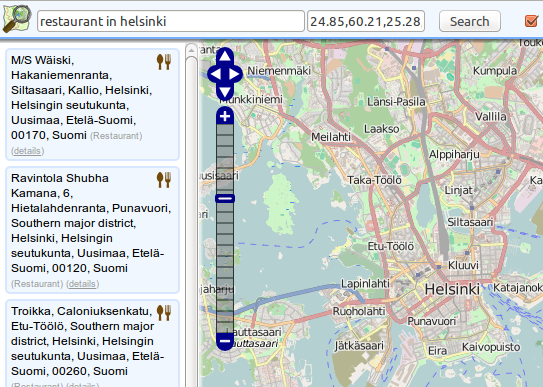
At this point, the site is ready and you can point your browser to the base URL and try it out. It should look something like this:
11 Enable OSM Updates
We will configure a cron job to have the database updated periodically using diffs from Geofabrik.de. As the nominatim user:
rm settings/configuration.txt
./utils/setup.php --osmosis-init
Enable hierarchical updates in the database (these were off during import to speed things up):
./utils/setup.php --create-functions --enable-diff-updates
Run once to get up to date:
./utils/update.php --import-osmosis --no-npi
There seems to be a time check in the import function that prevents another run immediately. Instead it will wait until the interval configured in the "Configure Local Settings" section earlier in this post has passed (default is 1 day).
We will add the command to crontab to be executed every monday at 03:00. Run:
crontab -e
Add a new line to the crontab file looking like this:
00 03 * * mon /home/nominatim/Nominatim/utils/update.php --import-osmosis --no-npi >>/home/nominatim/nominatim-update.log 2>&1
A log file will be created as /home/nominatim/nominatim-update.log.
12 Wrap Up
That's it! You can get JSON or XML data out of the database with http requests. A couple of examples:
Forward geocoding:
Reverse geocoding:
Check out the Nominatim documentation for details.
This post was adapted from my notes of such an installation process. Let me know in the comments section if I introduced any mistakes. Other comments are also welcome!