
SSH tunneling your way through multiple gateways
Ths SSH protocol supports tunneling arbitrary ports from your local host to a remote network that is only reachable through a remote gateway machine. The typical situation is that you have a, say, web server in a network which is only accessible from inside the network. If you have an ssh gateway machine within the network, you can get to the web server using tunneling.
A Simple Tunnel
This is what a typical one-gateway tunneling looks like:
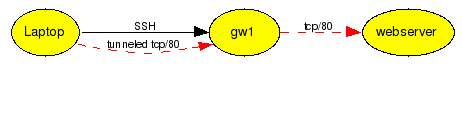
Here's how to set it up:
mkortela@laptop:~ $ ssh -L 8080:webserver:80 gw
mkortela@gw:~ $
Now I can connect to my laptop's localhost:8080 and access the webserver's content. I chose port 8080 because port 80 is a restricted port (you need to be root to listen to ports under 1024). Also, make sure to choose a port which is not in use.
Multiple Gateways
If there are multiple gateway hosts between local host and the webserver, the solution becomes a little bit more tricky. I have to make sure that the tunnel goes all the way from my laptop to the last gateway, which then forwards the connection to the target web server.

mkortela@laptop:~ $ ssh -L 1234:localhost:1234 gw1
mkortela@gw1:~ $ ssh -L 1234:webserver:80 gw2
mkortela@gw2:~ $
Now I am be able to connect to my laptop's localhost:1234, which is tunneled over two ssh tunnels to webserver:80.
A shorter form:
mkortela@laptop:~ $ ssh -L 1234:localhost:1234 gw1 "ssh -L 1234:server:1234 gw2"
You can add as many hops as you like.
mkortela@laptop:~ $ ssh -L 1234:localhost:1234 gw1
mkortela@gw1:~ $ ssh -L 1234:localhost:1234 gw2
mkortela@gw2:~ $ ssh -L 1234:localhost:1234 gw3
mkortela@gw3:~ $ ssh -L 1234:webserver:80 gw4
mkortela@gw4:~ $
Just make sure the port you choose is not in use on any machine. You can use a different port for each hop if you like.