
Dynamic IPv6 routing with Cisco IOS and Quagga on OpenWRT
Here's how to make dynamic IPv6 routing work between a Cisco IOS router and an OpenWRT Linux Quagga router. I couldn't find a similar howto anywhere, so I decided to write my own.
I am using OpenWRT Kamikaze 7.09 (kernel 2.4) on an ASUS WL-500gP wireless router. Any IPv6 enabled Cisco router should do.
I assume you have already installed the IPV6 kernel modules and userland tools, and set up static addresses for your interfaces (if you haven't check out the OpenWRT IPv6 Howto).
I am using SixXS for tunneling an IPv6 /48 prefix over IPv4. Here's a diagram of my setup:
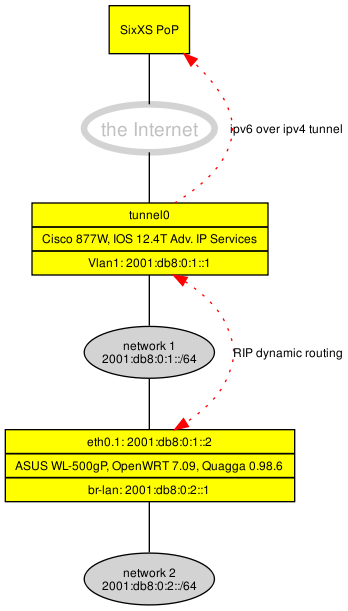
Install Quagga
To install Quagga, add the Kamikaze 7.06 repository (the 7.09 repository does not have Quagga yet).
root@OpenWrt:~# echo "src oldrelease http://downloads.openwrt.org/kamikaze/7.06/brcm47xx-2.6/packages" >>/etc/ipkg.conf
root@OpenWrt:~# ipkg update
root@OpenWrt:~# ipkg install quagga
root@OpenWrt:~# ipkg install quagga-libzebra
root@OpenWrt:~# ipkg install quagga-ripngd
If you want to use OSPFv3 for IPv6, install also the ospf6d package:
root@OpenWrt:~# ipkg install quagga-ospf6d
In this howto, we will use the ripngd daemon because it is easier to set up and good enough for our small network.
Configure Zebra
To create an initial configuration file for the Zebra daemon, create a /etc/quagga/zebra.conf:
!
! Zebra configuration file
!
hostname wl1
password zebra
enable password zebra
!
log stdout
!
!
You should, of course, customize your passwords (and hostname). Then start Quagga daemons:
root@OpenWrt:~# /etc/init.d/quagga start
quagga.init: Starting zebra ... done.
quagga.init: Starting watchquagga ... done.
Two new processes should be running, the Zebra daemon and the "watchguagga" daemon:
5083 quagga      852 S   /usr/sbin/zebra -d
5088 root        424 S   /usr/sbin/watchquagga -d -z -T 60 -R /usr/sbin/quagga.init watchrestart zebra
You can now telnet to the default port:
root@OpenWrt:~# telnet localhost 2601

Entering character mode
Escape character is '^]'.

Hello, this is Quagga (version 0.98.6).
Copyright 1996-2005 Kunihiro Ishiguro, et al.

User Access Verification

Password:
wl1> ?
  echo      Echo a message back to the vty
  enable    Turn on privileged mode command
  exit      Exit current mode and down to previous mode
  help      Description of the interactive help system
  list      Print command list
  quit      Exit current mode and down to previous mode
  show      Show running system information
  terminal  Set terminal line parameters
  who       Display who is on vty
wl1>
Very Ciscoish, eh? Although the command set is far from "complete", many commands work like they do on Cisco IOS:
wl1> show ip forwarding
IP forwarding is on
wl1> show ipv6 forwarding
ipv6 forwarding is off
wl1> enable
Password:
wl1# conf t
wl1(config)# ipv6 forwarding
wl1# write mem
Configuration saved to /etc/quagga//zebra.conf
Configure ripngd
The Zebra daemon does not handle any dynamic routing, it just works as a routing information redistributor. It will forward routing information between different dynamic routing daemons (ospf, rip, bgp) and the kernel routing table. Whenever the ripng daemon detects a change in the network's routing configuration, it will hand down the change to Zebra, which in turn will make a modification to the kernel routing table (which is the actual, effective routing table). If you have another routing daemon process running, Zebra will also notify that daemon about the change.
To configure ripngd, create an initial config:
root@OpenWrt:~# echo hostname wl1 > /etc/quagga/ripngd.conf
root@OpenWrt:~# echo router ripng >> /etc/quagga/ripngd.conf
root@OpenWrt:~# echo password zebra >> /etc/quagga/ripngd.conf
root@OpenWrt:~# echo enable password zebra >> /etc/quagga/ripngd.conf
Then restart quagga:
root@OpenWrt:~# /etc/init.d/quagga restart
quagga.init: Stopping watchquagga ... killed 11576 ... done.
quagga.init: Stopping zebra ... killed 11571 ... done.
quagga.init: Starting zebra ... done.
quagga.init: Starting ripngd ... done.
quagga.init: Starting watchquagga ... done.
Configure dynamic routing with RIP:
root@OpenWrt:~# telnet localhost 2603

Entering character mode
Escape character is '^]'.

Hello, this is Quagga (version 0.98.6).
Copyright 1996-2005 Kunihiro Ishiguro, et al.

User Access Verification

Password:
wl1> enable
Password:
wl1# conf t
wl1(config)# router ripng
wl1(config-router)# network br-lan
wl1(config-router)# network eth0.1
wl1(config-router)# end
wl1# wr mem
Configuration saved to /etc/quagga//ripngd.conf
Cisco IOS Configuration
Next we will have to configure the other participant of the dynamic routing process. I am using a Cisco 877W with Advanced IP Services (you don't get IPv6 support below that level).
Cisco IOS Configuration:
cisco#conf t
cisco(config)#ipv6 router rip ripng
cisco(config-rtr)#redistribute connected
cisco(config-rtr)#redistribute static
cisco(config)#interface vlan 1
cisco(config-if)#ipv6 rip ripng enable
That's it! After a while you should see the routes propagated between the two routers:
root@OpenWrt:~# ip -f inet6 route
2001:db8:100:100::/64 via fe80::21c:eff:fed9:32ef dev eth0.1  proto zebra  metric 2  mtu 1500 advmss 1440
2001:db8:0:1::/64 dev eth0.1  proto kernel  metric 256  expires 2584987sec mtu 1500 advmss 1440
2001:db8:0:3::/64 dev br-lan  metric 256  mtu 1500 advmss 1440
2000::/3 via fe80::21c:eff:fed9:32ef dev eth0.1  proto zebra  metric 2  mtu 1500 advmss 1440
fe80::/64 dev eth0  metric 256  mtu 1500 advmss 1440
fe80::/64 dev eth0.0  metric 256  mtu 1500 advmss 1440
fe80::/64 dev br-lan  metric 256  mtu 1500 advmss 1440
fe80::/64 dev eth0.1  metric 256  mtu 1500 advmss 1440
fe80::/64 dev wl0  metric 256  mtu 1500 advmss 1440
ff00::/8 dev eth0  metric 256  mtu 1500 advmss 1440
ff00::/8 dev eth0.0  metric 256  mtu 1500 advmss 1440
ff00::/8 dev br-lan  metric 256  mtu 1500 advmss 1440
ff00::/8 dev eth0.1  metric 256  mtu 1500 advmss 1440
ff00::/8 dev wl0  metric 256  mtu 1500 advmss 1440
unreachable default dev lo  proto none  metric -1  error -128
cisco#show ipv6 route
IPv6 Routing Table - 8 entries
Codes: C - Connected, L - Local, S - Static, R - RIP, B - BGP
       U - Per-user Static route
       I1 - ISIS L1, I2 - ISIS L2, IA - ISIS interarea, IS - ISIS summary
       O - OSPF intra, OI - OSPF inter, OE1 - OSPF ext 1, OE2 - OSPF ext 2
       ON1 - OSPF NSSA ext 1, ON2 - OSPF NSSA ext 2
       D - EIGRP, EX - EIGRP external
S   2000::/3 [1/0]
     via 2001:14B8:100:1DB::1
C   2001:db8:100:100::/64 [0/0]
     via ::, Tunnel0
L   2001:db8:100:100::2/128 [0/0]
     via ::, Tunnel0
C   2001:db8:0:1::/64 [0/0]
     via ::, Vlan1
L   2001:db8:0:1::1/128 [0/0]
     via ::, Vlan1
R   2001:db8:0:2::/64 [120/2]
     via FE80::217:31FF:FED6:983E, Vlan1
L   FE80::/10 [0/0]
     via ::, Null0
L   FF00::/8 [0/0]
     via ::, Null0